⚖️ 7.3 Statutory Allowance Breakdown & Freemium Tiers in Google Calendar™ Add-on
When creating business trips directly from Google Calendar™, PerDiemo provides a complete statutory breakdown computed by its deterministic legislative calculation engine. This article details the 10 statutory per diem parameters, the space-efficient collapsible sidebar layout, and the differences between the complimentary Free tier and premium paid plans (Starter, Business, Professional).
---
📊 The 10 Statutory Allowance Parameters
PerDiemo's calculation engine processes your synthesized itinerary and displays a structured Statutory Allowance Breakdown section:
1. Total Days: The total number of calendar days spanned by the business trip.
2. Total Statutory Per Diem: Net statutory allowance entitlement after applying meal deductions (in both CZK and primary EUR currency).
3. Total Mileage: Total travel distance calculated via the highway routing engine (in km and miles based on locale).
4. Pocket Money: Discretionary foreign allowance component under Section 180 of the Czech Labor Code (up to 40% of duration tier rate).
5. Meal Deductions: Statutory deductions applied for free employer-provided meals (breakfast, lunch, dinner) under Sections 163 & 170 ZP.
6. Vehicle Compensation: Statutory mileage reimbursement and wear-and-tear compensation for private vehicle usage (§ 157 ZP).
7. Foreign Days: Number of calendar days involving active international travel.
8. Domestic Days: Number of calendar days spent on domestic territory before border departure or after return.
9. Total Per Diem (Foreign): Net allowance accrued during international duration brackets.
10. Total Per Diem (Domestic): Net allowance accrued on domestic journey legs.
---
📱 Space-Efficient Collapsible Sidebar Cards
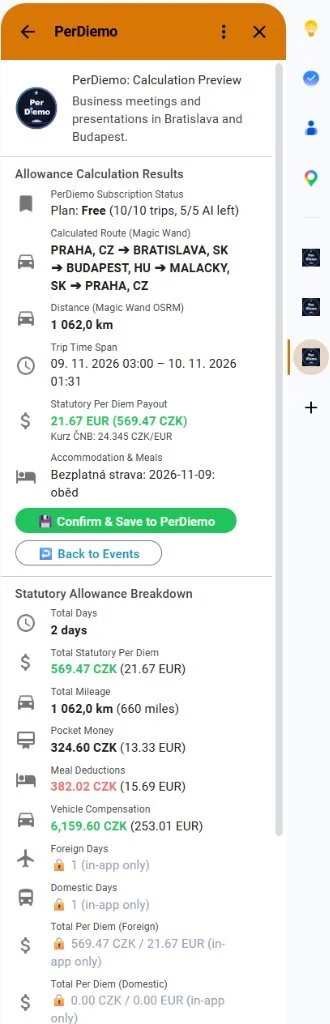
The standard desktop Google Calendar™ sidebar is approximately 300 pixels wide. Rendering 10 simultaneous rows pushes the critical 💾 Confirm & Save to PerDiemo action button below the fold, forcing unnecessary scrolling.
To maximize usability, the calculation preview card employs a smart collapsible section:
- Default view: Displays 3 high-level metrics (Total Days, Total Statutory Per Diem, and Total Mileage).
- Clicking Show more expands the complete 10-item breakdown with a single click.
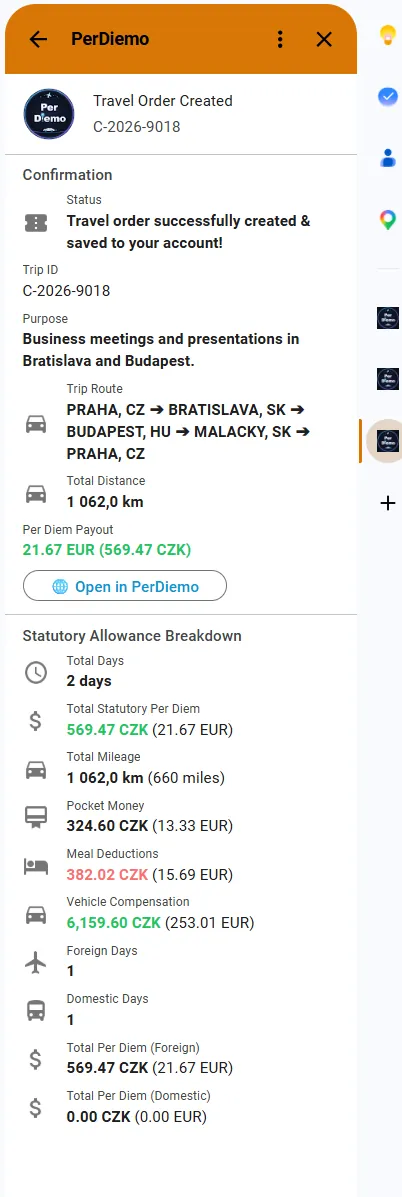
- On the Success Confirmation Card, the section is permanently expanded because the travel order is already finalized and stored.
---
🔒 Free Tier vs. Paid Plans Gating
PerDiemo operates on a transparent Freemium model:
1. Free Tier
- Complimentary access to 10 trips/year and 5 AI analyses.
- Preview cards display core summary metrics (Total Per Diem, Mileage, Pocket Money, and Meal Deductions).
- The 4 granular statutory parameters (Foreign Days, Domestic Days, Total Foreign Per Diem, and Total Domestic Per Diem) are styled in muted color with a lock badge 🔒 In-app only. These granular breakdowns remain fully accessible once the trip is opened in the web dashboard.
2. Paid Tiers (Starter, Business, Professional)
- All 10 Parameters Unlocked: All 10 statutory metrics are rendered in high-contrast text directly within Google Calendar™ without needing to open the web dashboard.
- Color-Coded Visual Cues: Green highlights for net statutory payouts, red for meal deductions, and cyan for vehicle compensations.
- Live Quota Tracking: The top card displays active subscription status with remaining annual allowances (e.g., `Plan: Starter (39/40 trips, 38/40 AI left) 🚀`).
---
📈 Upgrading Your Plan
When you reach the 10-trip annual allowance or require team collaboration and instant unlocked metrics inside Google Calendar™, you can upgrade your plan anytime in the PerDiemo web dashboard under Subscription. Tier changes take effect immediately in the add-on upon your next calculation.
---