🧭 7.2 Guide: Automated Trip Creation and Calculation from Google Calendar™
This practical guide walks you step-by-step through generating a complete, legally compliant business travel order from your Google Calendar™ meetings using the official PerDiemo Add-on with its 2-step verification wizard.
NOTE: > Processing duration across workflow phases:
- For AI itinerary parsing (Step 1/2): Please note this might take longer depending on current utilization of LLM models, but typically up to 30 seconds.
- For Magic Wand calculation (Step 2/2): Please note this operation is performed by our optimized mapping engine and should be completed in a matter of seconds.
---
📋 Process Overview
| Step | Phase | Description |
|---|---|---|
| 1 | Select Calendar Meeting | Click any business event in Google Calendar™ to detect nearby travel items within your search window. |
| 2 | Step 1/2: Waypoint Review | AI synthesizes travel purpose, transport mode, meal provisions, and provides an editable milestone list. |
| 3 | Step 2/2: Magic Wand Engine | Deterministic calculation of road mileage, border crossing timestamps, meal deductions, and statutory allowances. |
| 4 | Confirm & Save | Commit the trip to your database, receive a unique Trip ID, and review the full 10-parameter statutory breakdown. |
| 5 | PerDiemo Web Dashboard | Open the full interactive journey timeline with international border crossings, daily allowances, and PDF exports. |
Workflow Sequence: `Select meeting in calendar` ➔ `Review stops and event labels` ➔ `Magic Wand & statutory preview` ➔ `Save with assigned Trip ID` ➔ `Open in PerDiemo Web App`
---
Step 1: Select an Event in Google Calendar™ & Detect Meetings
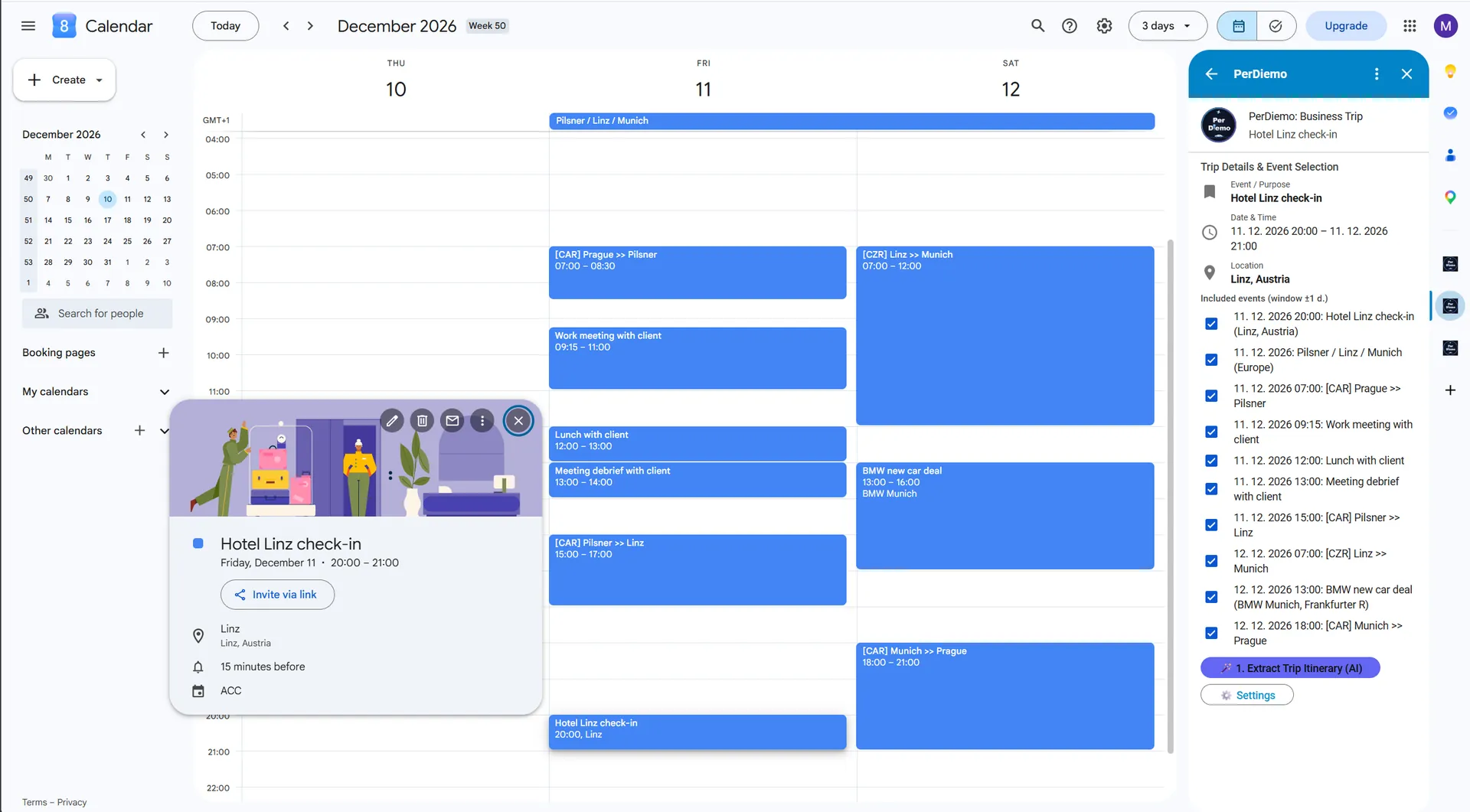
1. Open Google Calendar™ in your desktop web browser or mobile app. 2. Click any appointment or hotel check-in that forms part of your business trip (e.g., Hotel Linz check-in on Friday, December 11, 2026, 20:00 – 21:00). 3. In the right-hand sidebar, click the PerDiemo icon. 4. The Trip Details & Event Selection Card opens immediately:- Meeting title and purpose (Hotel Linz check-in, 11. 12. 2026 20:00 – 21:00).
- Location venue field from calendar details (Linz, Austria).
- List of all surrounding events discovered within your configured search window (e.g., ±1 day):
- [CAR] Prague >> Pilsner
- Work meeting with client
- Lunch with client
- Meeting debrief with client
- [CAR] Pilsner >> Linz
- Hotel Linz check-in
- [CZR] Linz >> Munich
- BMW new car deal (BMW Munich, Frankfurter R)
- [CAR] Munich >> Prague
---
Step 2: Step 1/2 – Itinerary Review & Waypoint Selection
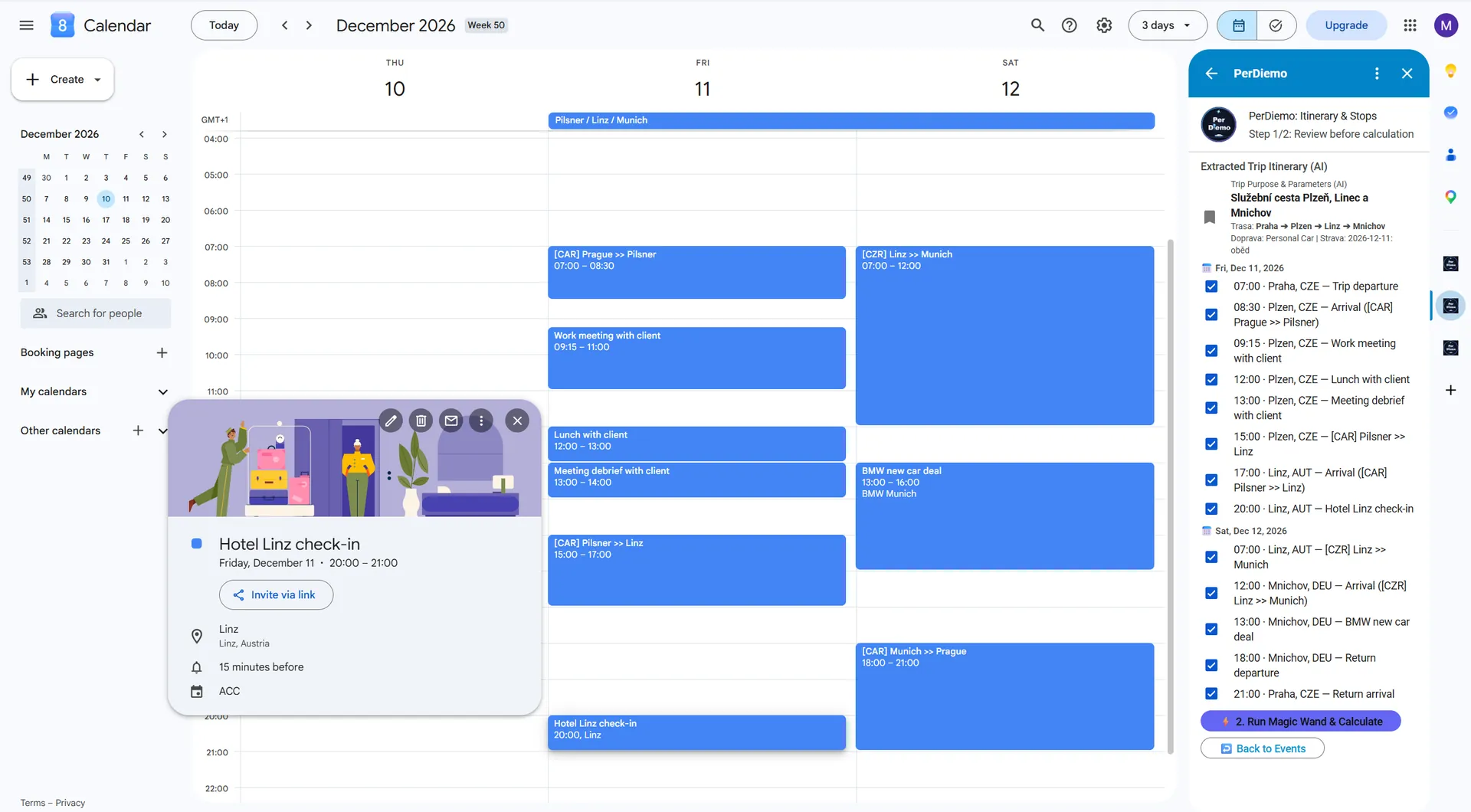
Within seconds, Gemini™ AI resolves the context across all selected meetings and displays the Itinerary Review Card (Step 1/2):- Trip Purpose & Logistics: Služební cesta Plzeň, Linec a Mnichov (Business trip Pilsen, Linz, and Munich).
- Default Parameters: Route (Praha ➔ Plzen ➔ Linz ➔ Mnichov), transport mode (Personal Car), and detected complimentary meals (2026-12-11: oběd / lunch).
- Annotated Waypoint List with Timestamps:
- `Friday, Dec 11, 2026 07:00 · Prague, CZE – Trip departure`
- `Friday, Dec 11, 2026 08:30 · Pilsen, CZE – Arrival ([CAR] Prague >> Pilsner)`
- `Friday, Dec 11, 2026 09:15 · Pilsen, CZE – Work meeting with client`
- `Friday, Dec 11, 2026 12:00 · Pilsen, CZE – Lunch with client`
- `Friday, Dec 11, 2026 13:00 · Pilsen, CZE – Meeting debrief with client`
- `Friday, Dec 11, 2026 15:00 · Pilsen, CZE – Departure ([CAR] Pilsner >> Linz)`
- `Friday, Dec 11, 2026 17:00 · Linz, AUT – Arrival ([CAR] Pilsner >> Linz)`
- `Friday, Dec 11, 2026 20:00 · Linz, AUT – Hotel Linz check-in`
- `Saturday, Dec 12, 2026 07:00 · Linz, AUT – Departure ([CZR] Linz >> Munich)`
- `Saturday, Dec 12, 2026 12:00 · Munich, DEU – Arrival ([CZR] Linz >> Munich)`
- `Saturday, Dec 12, 2026 13:00 · Munich, DEU – BMW new car deal`
- `Saturday, Dec 12, 2026 18:00 · Munich, DEU – Return departure`
- `Saturday, Dec 12, 2026 21:00 · Prague, CZE – Return arrival`
- Uncheck any waypoint you wish to omit from routing.
- Click ⚡ 2. Run Magic Wand & Calculate.
---
Step 3: Step 2/2 – Magic Wand Calculation Preview
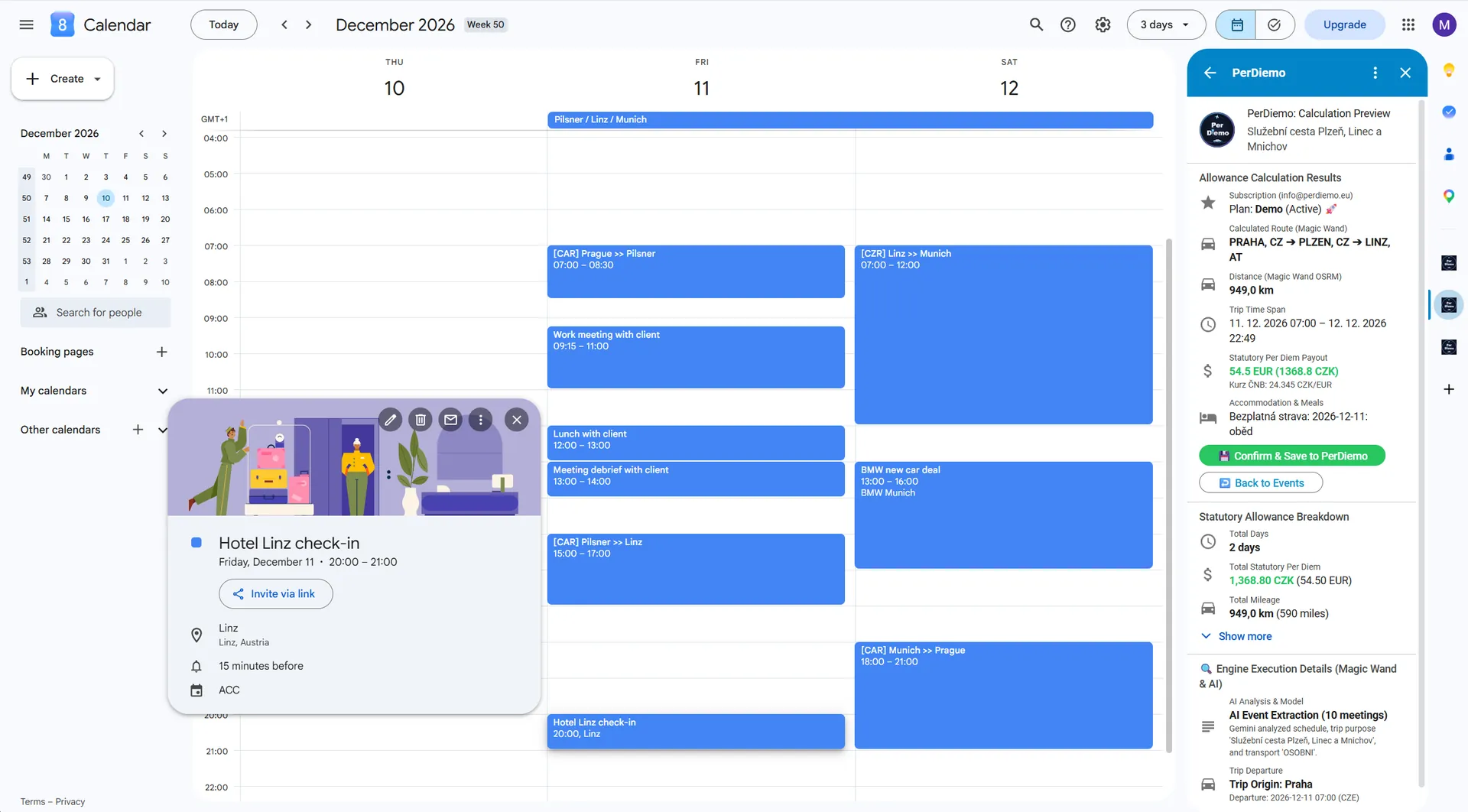
In 1–2 seconds, the deterministic engine processes your route and renders the Statutory Allowances Preview Card:- Route Chain: Continuous highway and city sequence: `PRAHA, CZ ➔ PLZEN, CZ ➔ LINZ, AT`.
- Distance: Precise road distance: `949.0 km` (590 miles).
- Trip Time Span: `11. 12. 2026 07:00 – 12. 12. 2026 22:49` (2 calendar days).
- Statutory Per Diem: Net payout: `54.5 EUR (1,368.80 CZK)` converted with Decisive CNB Exchange Rate `24.345 CZK/EUR` (Section 183 of the Czech Labor Code).
- Meal Reductions: Mandatory deduction applied for complimentary lunch on Dec 11, 2026.
- Allowance Breakdown: Detailed breakdown of total per diem, pocket money (`632.97 CZK`), meal deductions (`353.62 CZK`), and vehicle compensations (`4,106.40 CZK`). For tier details, see Chapter 7.3 Statutory Allowance Breakdown & Freemium Tiers and our guide on How to Create a Travel Order from Google Calendar™.
- Click the green button 💾 Confirm & Save to PerDiemo.
---
Step 4: Confirm, Save & Unique Trip ID
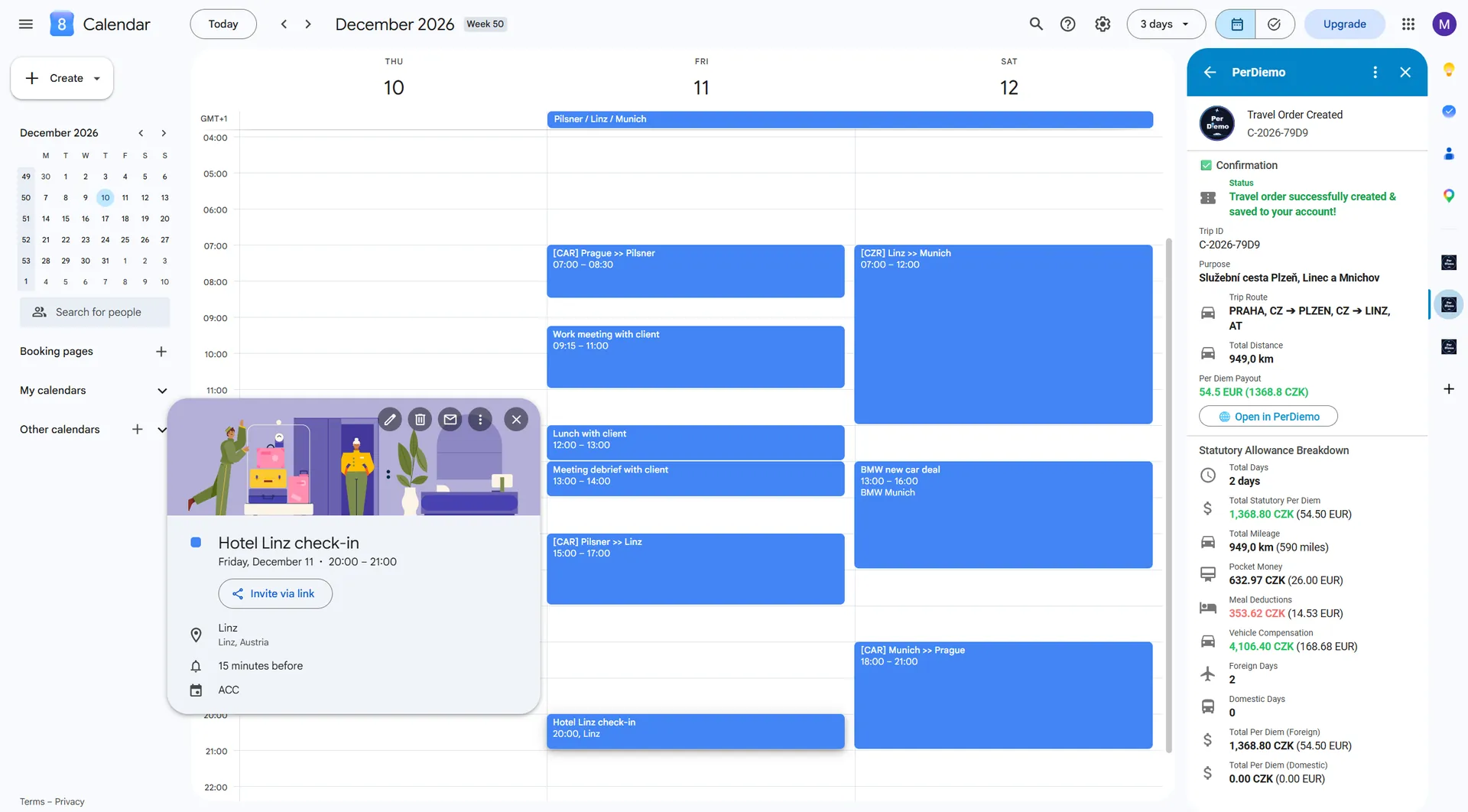
Upon confirmation, the add-on commits the journey to your database and presents the Travel Order Created Card:- Green confirmation banner confirming the trip has been recorded.
- Assigned Unique Trip ID: e.g., `C-2026-79D9`.
- Journey Summary:
- Purpose: Služební cesta Plzeň, Linec a Mnichov.
- Route: `PRAHA, CZ ➔ PLZEN, CZ ➔ LINZ, AT`.
- Total Highway Distance: `949.0 km`.
- Net Per Diem Payout: `54.5 EUR (1,368.80 CZK)`.
- Complete 10-Parameter Statutory Breakdown:
- Total Days: `2 days` (Foreign Days: `2`, Domestic Days: `0`).
- Total Statutory Per Diem: `1,368.80 CZK (54.50 EUR)`.
- Total Mileage: `949.0 km (590 miles)`.
- Pocket Money: `632.97 CZK (26.00 EUR)`.
- Meal Deductions: `353.62 CZK (14.53 EUR)`.
- Vehicle Compensation: `4,106.40 CZK (168.68 EUR)`.
- Click 🌐 Open in PerDiemo to view the full report in the web app or print the official PDF.
---
Step 5: Detailed Travel Order in PerDiemo Web Dashboard
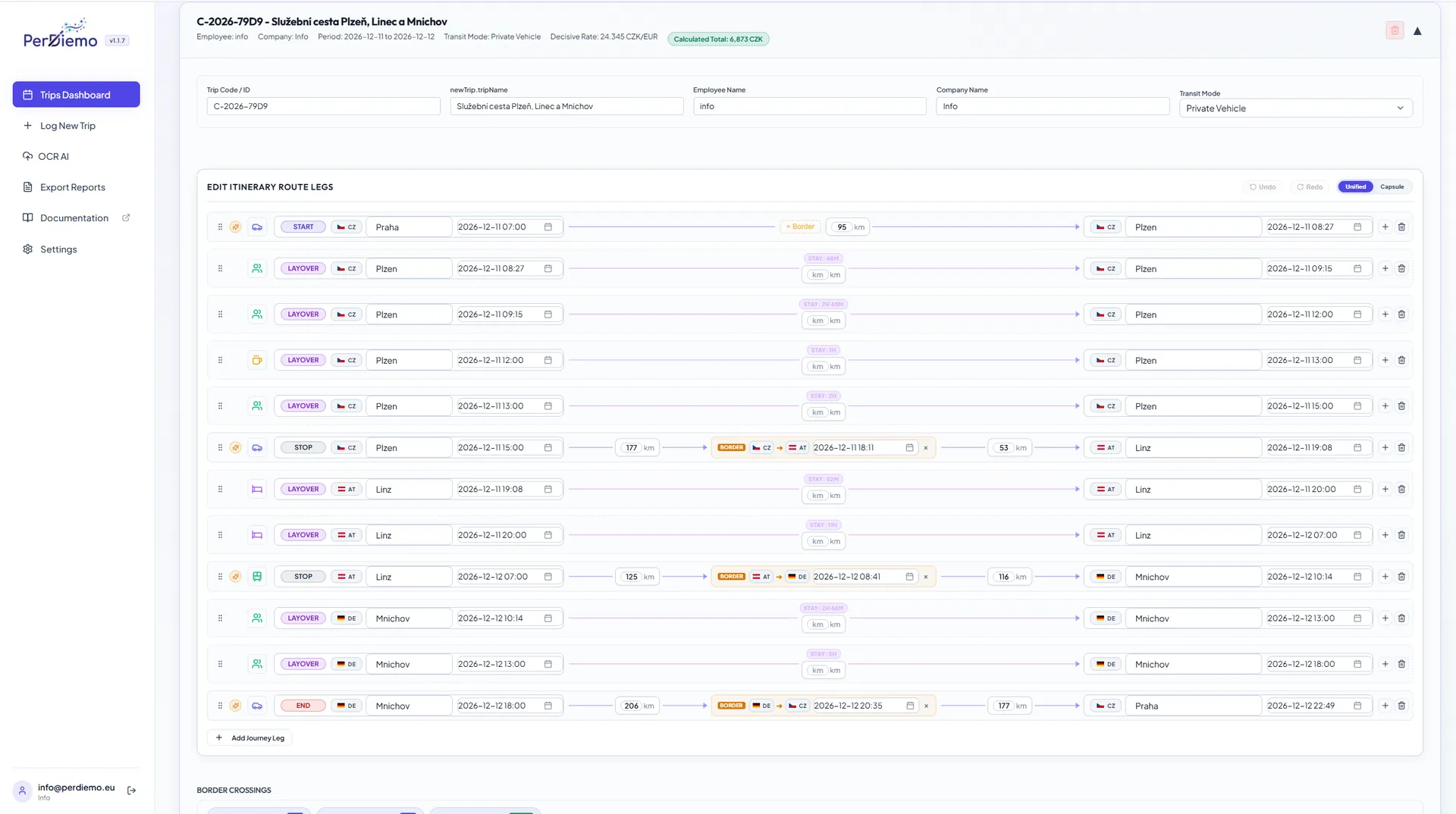
Clicking `Open in PerDiemo` launches the web application directly into the certified travel report for `C-2026-79D9`:- Interactive Journey Route Legs Timeline:
- `START` Prague (Dec 11, 07:00) ➔ `LAYOVER` Pilsen (08:27 – 15:00, 95 km).
- `STOP` Pilsen ➔ Linz (177 km + 53 km, automatic border crossing `CZ ➔ AT` at 18:11).
- `LAYOVER` Linz (hotel check-in until Dec 12, 07:00).
- `STOP` Linz ➔ Munich (125 km + 116 km, border crossing `AT ➔ DE` at 08:41).
- `END` Munich ➔ Prague (206 km + 177 km, border crossing `DE ➔ CZ` at 20:35, trip termination at 22:49).
- Certified Border Crossing Timestamps & Daily Breakdowns:
- Legitimate border crossing timestamps: `18:11 CZE ➔ AUT [Departure]`, `08:41 AUT ➔ DEU [Departure]`, `20:35 DEU ➔ CZE [Return]`.
- Daily per diem allocation with statutory meal reductions, foreign tax-free pocket money, and vehicle reimbursement.
- Audit-locked and ready for 1-click printable PDF generation or financial export (CSV, JSON, XML).
---
💡 Best Practices for Maximum Accuracy
TIP: > Populate the Location Field: Entering valid city or street addresses in Google Calendar™'s Where field enables the AI parser and highway router to locate exact geocoordinates without guessing from calendar text.
TIP: > Air Travel & Check-in Buffers: When your Google Calendar™ includes flight bookings (e.g., `PRG ➔ FRA`), the engine automatically incorporates the standard 3-hour airport check-in buffer to determine exact international border crossing timestamps.
---
NOTE: > Trademark Attribution: Google Calendar™, Google Workspace™, and Gemini™ are trademarks of Google LLC.