How to Create a Travel Order Directly from Google Calendar™: Automated Business Trips and Per Diems
Most executives, sales leaders, and consultants coordinate their professional schedules inside Google Calendar™. Client meeting venues, flight confirmations, hotel stays, and conference agendas are already logged there. Yet when month-end expense reporting arrives, professionals face the tedious chore of manually retyping dates, addresses, and timestamps into spreadsheets or accounting ERPs.
Under Section 153 of the Czech Labor Code (Act No. 262/2006 Coll.), a statutory travel order must establish verifiable journey conditions, including departure, intermediate stops, and arrival times. The official PerDiemo Google Workspace™ Add-on extracts calendar data automatically and computes statutory allowances deterministically under 2026 decrees (MPSV No. 490/2025 Coll. & MF No. 489/2025 Coll.) with 1 click. Travel expenses are tax-deductible corporate costs under Section 24(2)(k) of the Income Tax Act.
---
1. Why Manual Calendar Retyping Poses Tax Audit Vulnerabilities
Under established Supreme Administrative Court (NSS) case law (e.g., verdicts No. 2 Afs 37/2012 and 3 Afs 97/2025), the corporate taxpayer carries the sole burden of proof regarding the material facticity of business travel under Section 92 of the Tax Code.
When employees reconstruct business trips weeks later from memory:
1. Inaccurate Border Crossing Timestamps: Guessing when a vehicle crossed state borders distorts statutory foreign per diem tier entitlement under Section 170(3) of the Labor Code.
2. Improper Meal Reduction Claims: Forgetting to record complimentary hotel breakfasts or catered client dinners triggers taxable employee wage assessments under Section 6(7)(a) of the Income Tax Act.
3. Severe Operational Drain: Manually assembling a multi-day international travel claim averages 30 to 45 minutes per trip.
---
2. How the Google Workspace™ & PerDiemo Integration Works
The PerDiemo Add-on functions as a native sidebar directly within Google Calendar™ across desktop browsers and mobile devices.
The architecture combines two specialized engines:
- Natural Language Understanding (Google Gemini™ NLP): Parses informal meeting subjects, addresses in calendar Where fields, and organizer notes to identify travel milestones and provided dining.
- Deterministic Calculation Engine (Magic Wand): Calculates exact highway distances, pinpoints international border crossing timestamps, locks Decisive CNB Exchange Rates as of departure (Section 183(4) ZP), and compiles the official travel order.
Furthermore, it introduces Zero-Friction Silent Account Provisioning (Silent JIT Provisioning): If you do not have an existing PerDiemo account, you do not need to register or create a password beforehand. Confirming your first trip automatically provisions a complimentary Free tier account under your verified Google™ account address.
---
3. Step-by-Step: From Calendar Meeting to Certified Travel Report
Generating your travel order requires only 5 intuitive, sequential steps:
Step 1: Select Event & Detect Meetings in Google Calendar™
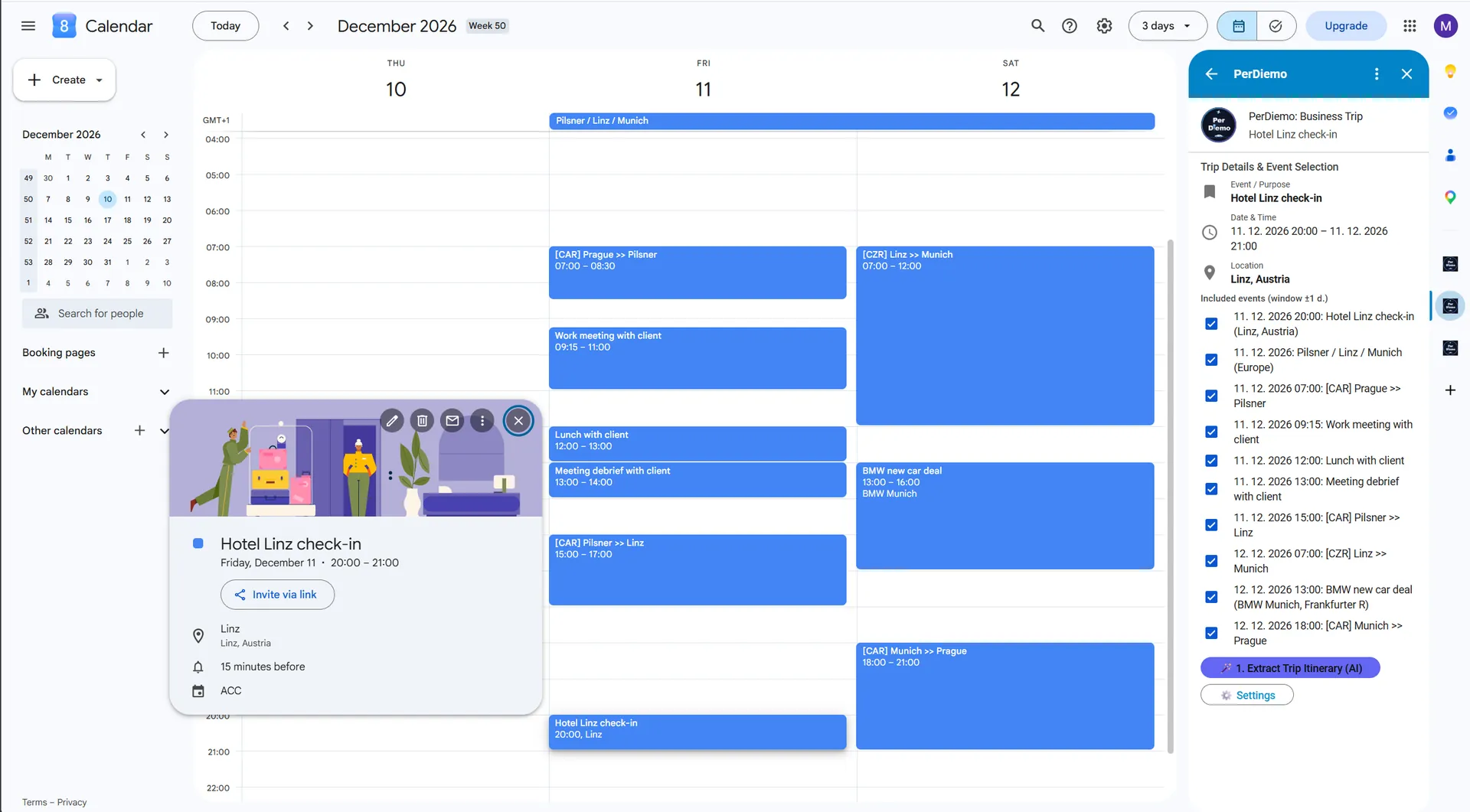
Open Google Calendar™ and click any appointment, flight, or hotel stay on your itinerary (e.g., Hotel Linz check-in on Friday, December 11, 2026, 20:00 – 21:00). In the right-hand sidebar, click the PerDiemo icon.The add-on instantly displays the active meeting details (Linz, Austria) and automatically discovers all nearby appointments within your search window (e.g., ±1 day):
- [CAR] Prague >> Pilsner
- Work meeting with client
- Lunch with client
- Meeting debrief with client
- [CAR] Pilsner >> Linz
- Hotel Linz check-in
- [CZR] Linz >> Munich
- BMW new car deal (BMW Munich, Frankfurter R)
- [CAR] Munich >> Prague
Use the checkboxes to verify the work events on your schedule, then click 🪄 1. Extract Trip Itinerary (AI):
---
Step 2: Review Waypoints (2-Step Verification Wizard Step 1/2)
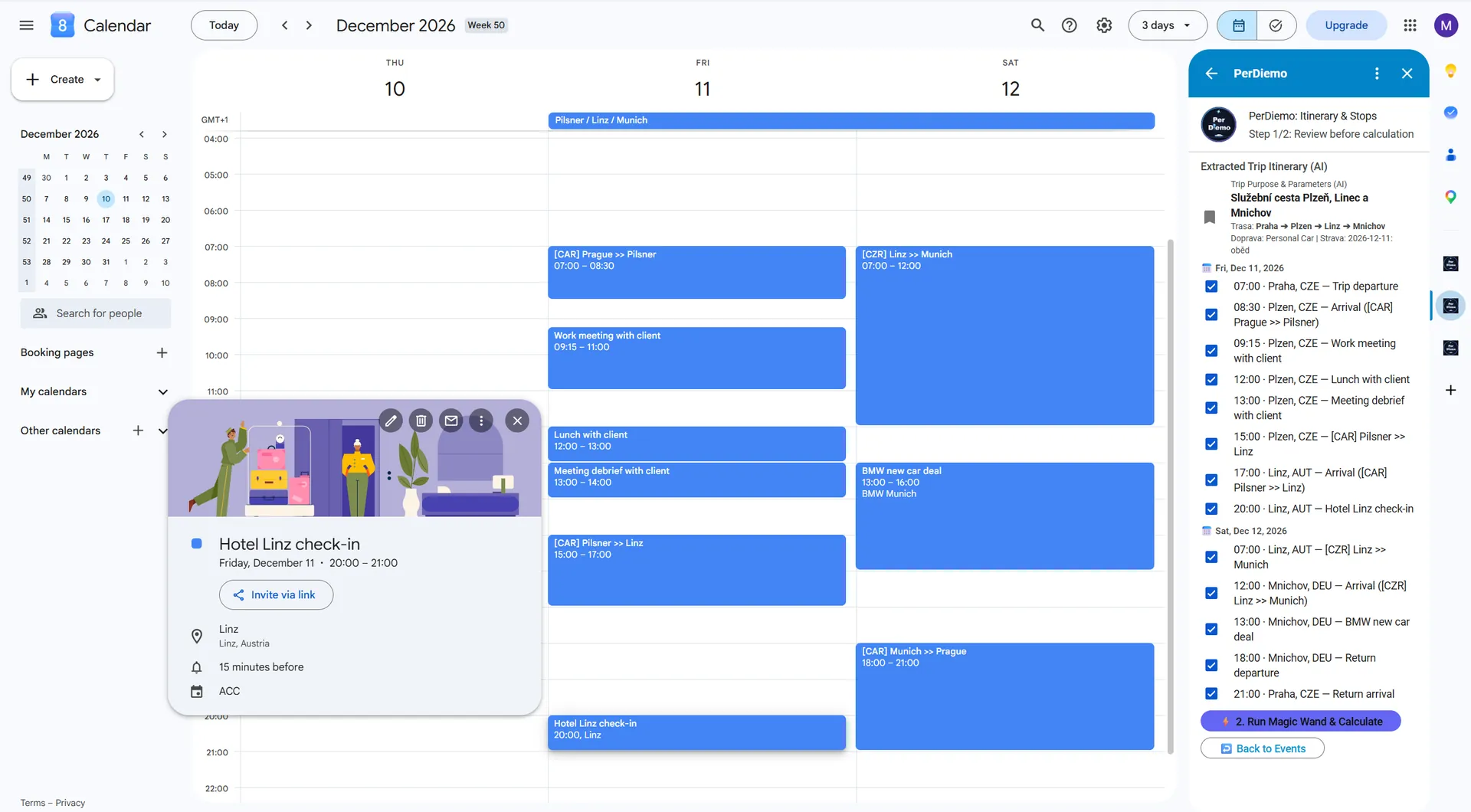
Gemini AI synthesizes the calendar context across all selected meetings and presents the Itinerary Review Card (Step 1/2):- Trip Purpose & Logistics: Služební cesta Plzeň, Linec a Mnichov (Business trip Pilsen, Linz, and Munich).
- Default Parameters: Projected route (Praha ➔ Plzen ➔ Linz ➔ Mnichov), transport mode (Personal Car), and detected complimentary dining (2026-12-11: oběd / lunch).
- Annotated Waypoint List with Timestamps:
- `Friday, Dec 11, 2026 07:00 · Prague, CZE – Trip departure`
- `Friday, Dec 11, 2026 08:30 · Pilsen, CZE – Arrival ([CAR] Prague >> Pilsner)`
- `Friday, Dec 11, 2026 09:15 · Pilsen, CZE – Work meeting with client`
- `Friday, Dec 11, 2026 12:00 · Pilsen, CZE – Lunch with client`
- `Friday, Dec 11, 2026 13:00 · Pilsen, CZE – Meeting debrief with client`
- `Friday, Dec 11, 2026 15:00 · Pilsen, CZE – Departure ([CAR] Pilsner >> Linz)`
- `Friday, Dec 11, 2026 17:00 · Linz, AUT – Arrival ([CAR] Pilsner >> Linz)`
- `Friday, Dec 11, 2026 20:00 · Linz, AUT – Hotel Linz check-in`
- `Saturday, Dec 12, 2026 07:00 · Linz, AUT – Departure ([CZR] Linz >> Munich)`
- `Saturday, Dec 12, 2026 12:00 · Munich, DEU – Arrival ([CZR] Linz >> Munich)`
- `Saturday, Dec 12, 2026 13:00 · Munich, DEU – BMW new car deal`
- `Saturday, Dec 12, 2026 18:00 · Munich, DEU – Return departure`
- `Saturday, Dec 12, 2026 21:00 · Prague, CZE – Return arrival`
You maintain full control: easily uncheck any unwanted waypoint, adjust vehicle settings, and click ⚡ 2. Run Magic Wand & Calculate:
---
Step 3: Instant Statutory Payout Preview & Magic Wand Engine (Step 2/2)
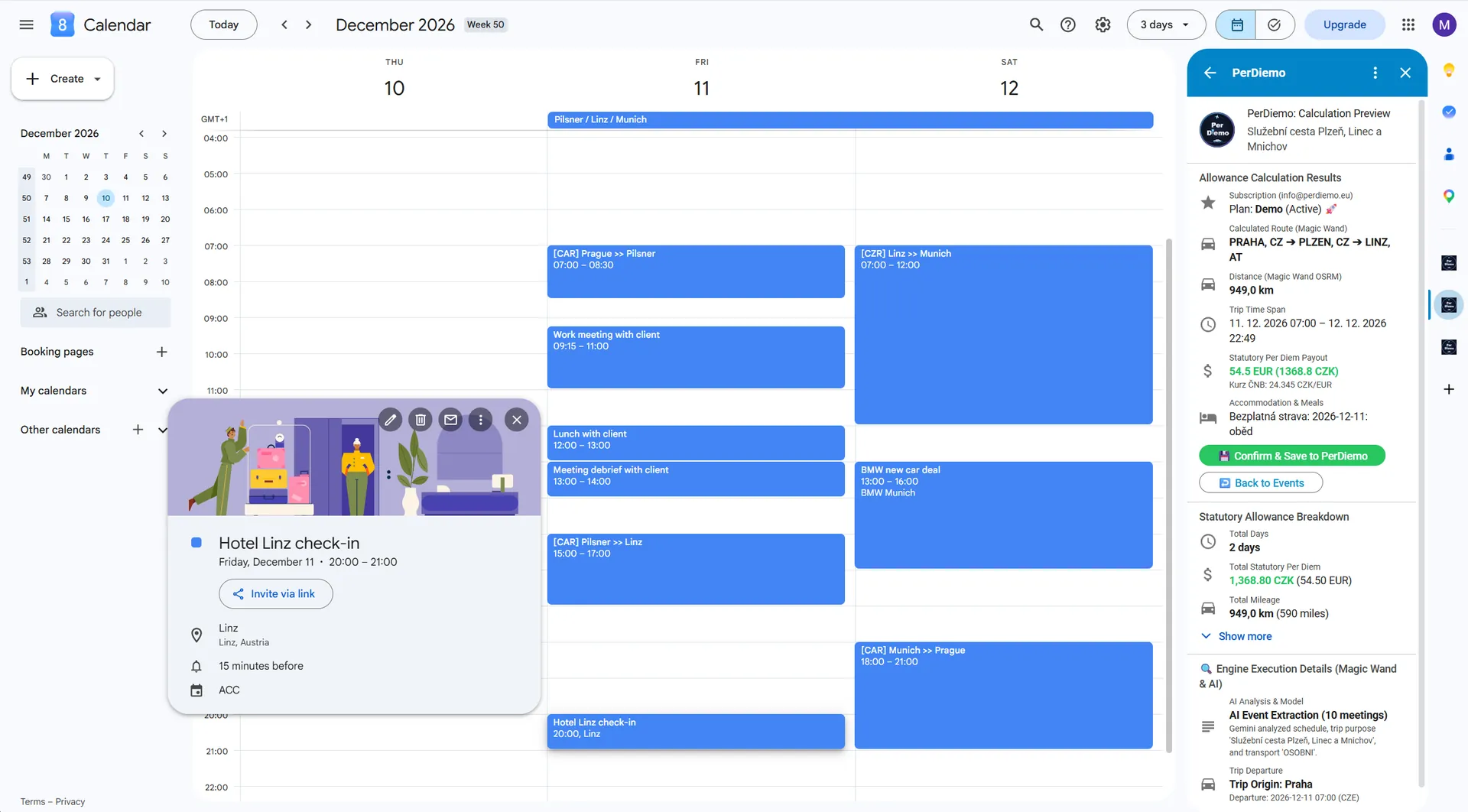
In 1–2 seconds, PerDiemo's deterministic engine computes the route and renders the complete statutory preview:- Continuous Highway Chain: `PRAHA, CZ ➔ PLZEN, CZ ➔ LINZ, AT`.
- Accurate Highway Distance: `949.0 km` (590 miles).
- Journey Span: `11. 12. 2026 07:00 – 12. 12. 2026 22:49` (2 calendar days).
- Net Statutory Allowance: `54.5 EUR (1,368.80 CZK)` converted via official Decisive CNB Rate `24.345 CZK/EUR`.
- Statutory Meal Reductions: Automatically deducted for complimentary client lunch on Dec 11, 2026.
- Detailed Parameter Breakdown: Total days (2), net per diem, road distance, and vehicle reimbursements.
Click 💾 Confirm & Save to PerDiemo to commit the trip:
---
Step 4: Confirmation, Secure Save & Unique Trip ID
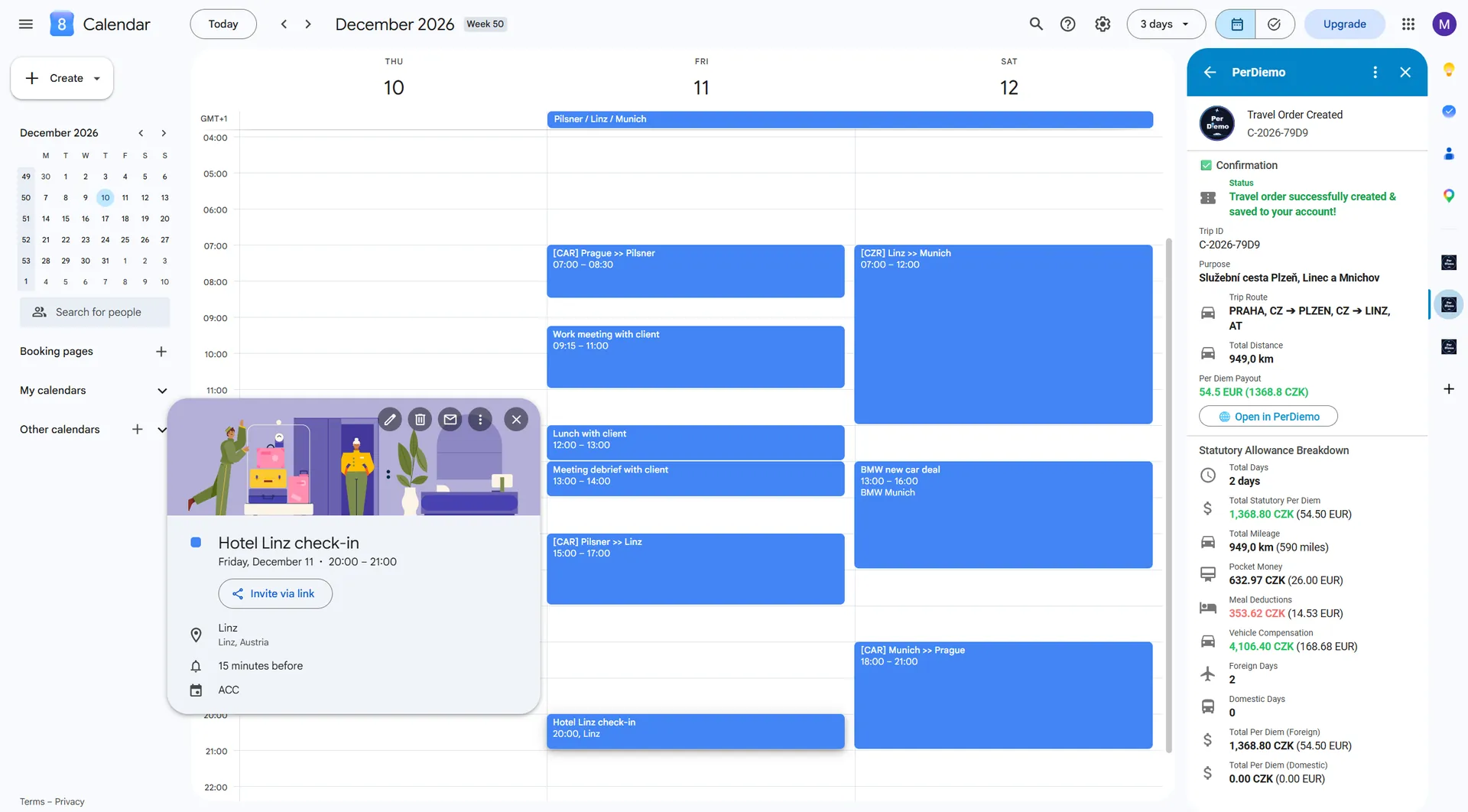
The journey is immediately written to your account and the add-on displays the Confirmation Card:- Green confirmation banner confirming the trip has been saved.
- Unique Evidentiary Trip ID: e.g., `C-2026-79D9`.
- Approved Settlement Summary:
- Route: `PRAHA, CZ ➔ PLZEN, CZ ➔ LINZ, AT` (`949.0 km`).
- Net Statutory Per Diem: `54.5 EUR (1,368.80 CZK)`.
- Pocket Money: `632.97 CZK (26.00 EUR)`.
- Meal Deductions: `353.62 CZK (14.53 EUR)`.
- Vehicle Compensation: `4,106.40 CZK (168.68 EUR)`.
- Click 🌐 Open in PerDiemo to launch the comprehensive web application:
---
Step 5: Full Travel Order in PerDiemo Web Dashboard
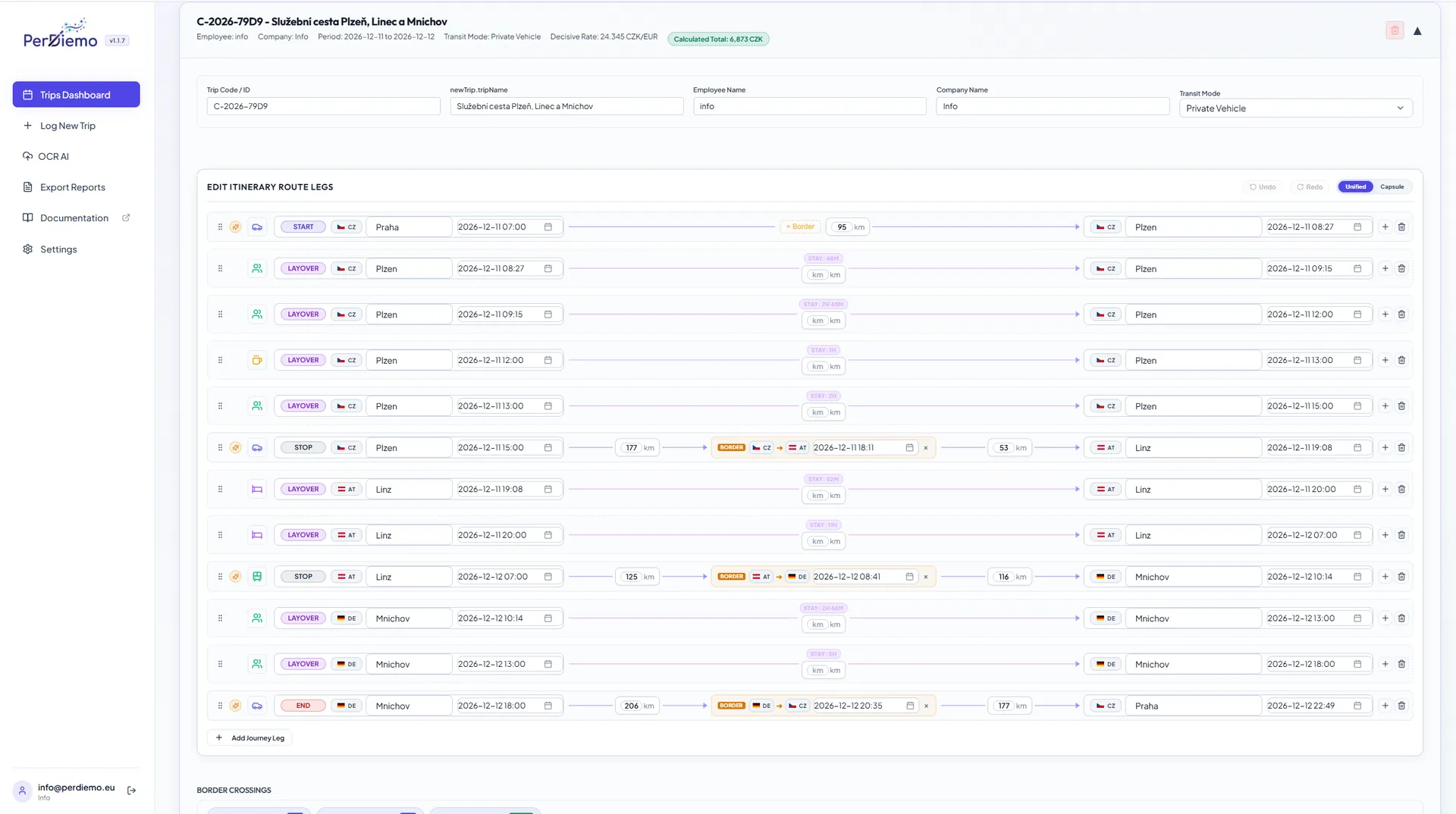
Clicking `Open in PerDiemo` displays the certified travel order `C-2026-79D9` in the desktop web application:- Visual Route Legs Editor: Sequential leg timeline (Prague ➔ Pilsen ➔ Linz ➔ Munich ➔ Prague) with distance counters and stay durations.
- Deterministic International Border Crossings: Legally documented border crossing timestamps (`18:11 CZE ➔ AUT [Departure]`, `08:41 AUT ➔ DEU [Departure]`, `20:35 DEU ➔ CZE [Return]`) providing ironclad tax audit proof.
- Daily Statutory Allowances & Deductions: Clean breakdown tables across travel days (Dec 11 & Dec 12, 2026) showing international hour splits, statutory meal reduction percentages, tax-free pocket money, and vehicle reimbursement.
- Audit-locked and ready for 1-click printable PDF generation or financial export (CSV, JSON, XML):
---
4. The 10 Statutory Parameters & Freemium Tier Architecture
PerDiemo exposes a complete breakdown of 10 statutory metrics directly in the sidebar:
| Parameter | Statutory Rule & Legislative Foundation |
|---|---|
| Total Days | Total number of calendar days spanned by the journey. |
| Total Statutory Per Diem | Net entitlement after statutory deductions for free meals. |
| Total Mileage | True highway road distance computed by highway router. |
| Pocket Money | Tax-free foreign pocket money up to 40% under Section 180 ZP. |
| Meal Deductions | Mandatory statutory deductions for free meals under Section 163 & Section 170(5) ZP. |
| Vehicle Compensation | Statutory vehicle mileage and wear allowance under Section 157 ZP. |
| Foreign Days | Days involving active international travel. |
| Domestic Days | Days spent on domestic territory. |
| Foreign Per Diem | Net international per diem in primary currency and CZK. |
| Domestic Per Diem | Net domestic per diem in CZK. |
Space-Efficient Collapsible UI & Freemium Gating
Because Google Calendar™ sidebars are only ~300px wide, the breakdown defaults to 3 summary metrics (Total Days, Total Per Diem, Total Mileage). Clicking Show more expands all 10 items, keeping the primary action button visible above the fold.- Free Tier: 10 trips/year and 5 AI analyses free. Granular metrics (Foreign/Domestic day splits) display a lock badge `🔒 In-app only` and remain accessible in the web dashboard.
- Paid Plans (Starter, Business, Professional): All 10 parameters are unlocked in vivid contrast, accompanied by live quota tracking (e.g., Plan: Starter – 39/40 trips left).
For exhaustive details, see Chapter 7.3 Statutory Allowance Breakdown & Freemium Tiers.
---
5. Preferences, Corporate Account Pairing & Multi-Tenant Security
Clicking ⚙️ Settings opens add-on customization:
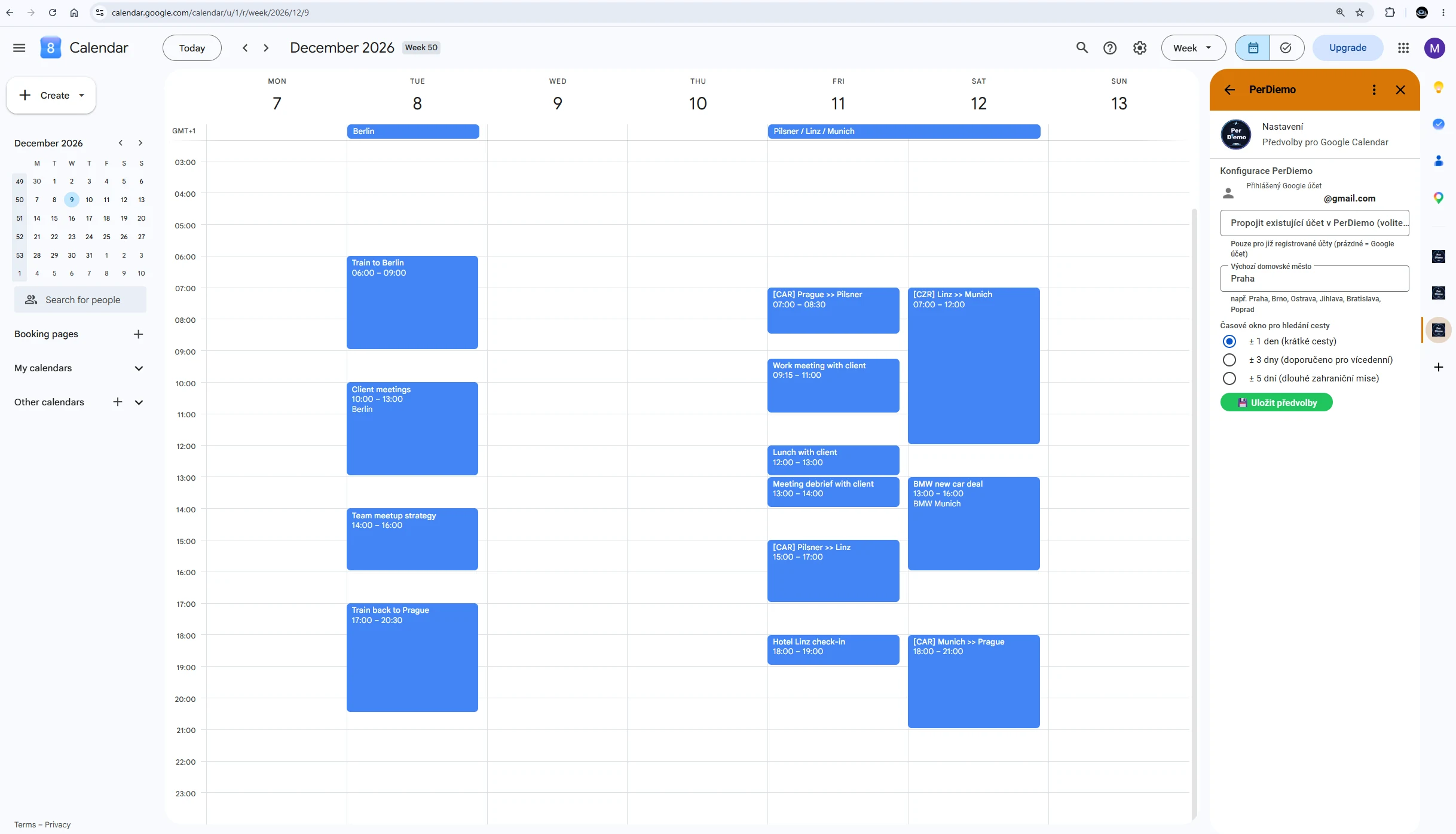
1. Default Home City: Configure your base city (e.g., Prague or Brno). The engine automatically assigns it as the journey's start and finish.
2. Search Window: Select ±1 day (day trips), ±3 days (multi-day regional travel), or ±5 days (extended international roadshows).
3. Link Corporate Account: If you manage personal calendars under Gmail™ but hold an enterprise PerDiemo subscription under your corporate domain (e.g., `john.doe@company.com`), enter it here to route trips into your corporate workspace.
---
6. Summary: Zero Spreadsheets, Complete Tax Audit Defense
The PerDiemo Google Workspace™ integration removes the friction of retroactive travel administration. Travel data is captured in real time, deterministically calculated against valid 2026 legislation, and ready for instant PDF export with an unalterable SHA-256 cryptographic audit trail.
Install the add-on from the Google Workspace Marketplace™ in under a minute and experience automated statutory travel management with 10 complimentary trips.
Explore our official Google Workspace™ & Google Calendar™ documentation for full technical reference.
---
Google Workspace™, Google Calendar™, Google Maps™, Gmail™, and Gemini™ are trademarks of Google LLC.